Overview
In this exercise, we installed PentAGI on Ubuntu, integrated it with the Gemini API, and used OWASP Juice Shop as the target. The objective was not to produce another installation recipe. It was to examine the components of an agent-based pentest platform, identify where tool execution occurs, and document the trust boundaries that must be maintained during operation.
PentAGI should not be treated like a conventional security scanner. It is an LLM-assisted pentest orchestration layer. The model interprets the objective, creates a test plan, selects suitable tools, reads their output, and decides what to do next. The actual commands run inside an isolated Kali container.
Our lab architecture looked roughly like this:
Administrator workstation
        |
        | HTTPS :8443
        v
Ubuntu lab server
  ├─ PentAGI web interface and services
  ├─ PostgreSQL / supporting services
  └─ Kali worker container created per Flow
              |
              | HTTP :3000
              v
       OWASP Juice Shop target lab

PentAGI ── HTTPS ──> Gemini API
This architecture separates the management plane, model service, and tool-execution layer. Pentest tools do not run directly on the Ubuntu host; they execute inside a Kali worker created for the Flow. Model inference is handled by the Gemini API rather than local hardware. This separation does not remove the attack surface, but it makes component privileges and data paths easier to analyze.
This guide is intended only for authorized, isolated laboratory environments. Testing systems you do not own, do not have explicit permission to assess, or that were not designed for security testing is neither ethical nor legally acceptable.
Understanding PentAGI: What Does the LLM Do, and What Does Kali Do?
PentAGI has two main roles: the side that reasons and the side that executes.
The LLM interprets the target and the task. For example, if we ask it to perform a limited OWASP Top 10 assessment against Juice Shop, the model plans what to inspect first. It may begin with reconnaissance, review HTTP headers, enumerate endpoints, or attempt a simple vulnerability validation. The model determines this sequence.
The Kali worker container handles execution. Tools such as nmap, curl, ffuf, nuclei, and sqlmap run there. The LLM is not magically testing the target by itself. It decides which tools to use and how to use them, then interprets each result to continue the workflow.
This distinction matters. When PentAGI downloads a Kali image or creates a separate worker container for every Flow, that is not an error. It is part of the design. The platform separates security tools from the host and gives each assessment a more controlled workspace.
Model-Layer Decision: Why Gemini API?
Agent-based pentesting is more demanding than ordinary chat usage. The model must follow a long context, interpret tool output correctly, produce valid JSON and tool calls, and plan several steps ahead. Smaller or weaker models may stop at generic suggestions instead of carrying out an actual assessment workflow.
Running a local model is possible, but that would also bring model serving, resource allocation, and lifecycle management into the lab scope. Our research target was PentAGI’s planning and tool-orchestration behavior, so inference was delegated to the Gemini API. This kept the Ubuntu resource profile focused on PentAGI services and worker containers.
There is also an important trade-off: prompts, tool output, and assessment context are sent to an external model provider. If a test involves customer data, confidential system details, or production output, the applicable data-processing terms must be evaluated first. In our case, the target was OWASP Juice Shop, which was deliberately created for lab use, so the risk was controlled.
Lab Requirements
Based on the components used in this lab, the following values should be treated as practical lower bounds:
| Resource | Recommendation |
|---|---|
| Operating system | Ubuntu 22.04 or 24.04 LTS |
| CPU | At least 2 vCPUs, preferably 4 vCPUs |
| Memory | At least 4 GB, preferably 8 GB |
| Disk | At least 20 GB free, preferably 40 GB or more |
| Network | Internet access and working DNS |
The installation can be attempted with 4 GB of memory, but the system may struggle when PentAGI services, PostgreSQL, and a worker container run at the same time. I recommend using a separate virtual machine rather than an actively used server.
Before installation, we can quickly inspect the available resources:
nproc
free -h
df -h /
lsb_release -a 2>/dev/null
Preparing Docker on Ubuntu
PentAGI is container-based, so Docker and Compose must be available first:
sudo apt update
sudo apt install -y docker.io docker-compose-plugin wget unzip curl
sudo systemctl enable --now docker
Verify the installation:
docker --version
docker compose version
sudo docker ps
I use sudo with Docker commands throughout this guide. Adding a user to the Docker group may be convenient, but remember that this effectively grants privileges close to root access.
Downloading and Starting the PentAGI Installer
Create a dedicated directory to keep the installation organized:
mkdir -p ~/pentagi
cd ~/pentagi
Download the Linux AMD64 installer:
wget -O installer.zip \
  https://pentagi.com/downloads/linux/amd64/installer-latest.zip
Extract the archive and run the installer:
unzip installer.zip
chmod +x installer
sudo ./installer
There are three key decisions in the installer: the LLM provider, the models assigned to each role, and which optional services should be enabled for the available resources.
Configuring the Gemini Provider
Select Google Gemini as the LLM provider and enter the following base URL:
https://generativelanguage.googleapis.comCreate an API key in Google AI Studio and enter it in the installer. Never place API keys in shell history, screenshots, Git repositories, or publicly accessible .env files.
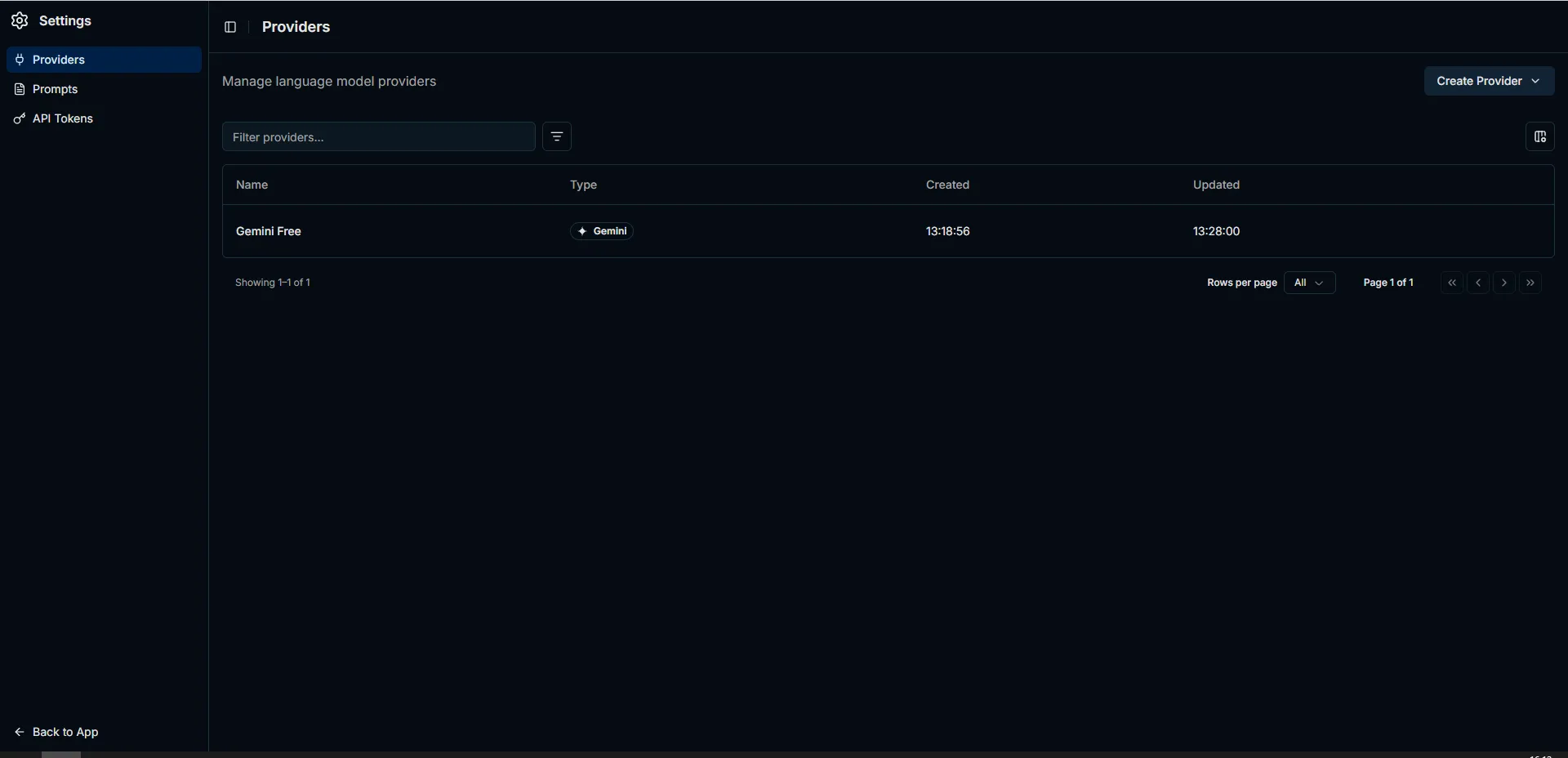
The Gemini provider entry created in our lab. No API key or other secret is visible in the screenshot.
For the model roles, select current Gemini models that are available to your account. A model appearing in an old guide or a model list does not guarantee that your account can use it. Account permissions, region, quota, and the model lifecycle can all affect availability.
If embeddings are enabled, select a Gemini embedding model as well. If the embedder is accidentally left on OpenAI without an OpenAI API key, the logs may contain API key warnings. This may not stop every basic Flow, but it can affect knowledge and vector-based features.
A Lean Setup for a Low-Resource Lab
You do not have to enable every component when the first objective is simply to confirm that the platform works. If memory is limited, consider leaving these components disabled during the initial setup:
- Advanced observability components
- Grafana and telemetry services
- Langfuse
- Additional memory or relationship layers such as Graphiti and Neo4j
Each of these services adds memory and storage overhead. The initial validation covered only the PentAGI interface, provider connectivity, and the basic Flow chain; observability and relationship-based memory services remained outside the test scope.
Checking the Services
After the installer finishes, inspect the container status:
cd ~/pentagi
sudo docker compose ps
Verify the addresses and ports on which the PentAGI web service is published:
sudo docker ps --format "table {{.Names}}\t{{.Status}}\t{{.Ports}}"Run a quick test from the server itself:
curl -vk https://127.0.0.1:8443The https:// scheme matters. If an HTTPS port is opened with HTTP, an error similar to “HTTP request to an HTTPS server” is expected.
To access the service from the local network, confirm that PentAGI is not listening only on 127.0.0.1:
sudo ss -lntp | grep 8443If only 127.0.0.1:8443 appears, other computers cannot connect. When remote access is required inside the lab, the listen address can be changed to 0.0.0.0. The firewall should still restrict access to the administrator workstation or the lab network rather than exposing the service to the entire internet.
First Login to the Web Interface
Open the following address in a browser:
https://SERVER_IP:8443The browser may display a warning because the lab uses a self-signed certificate. Verify the certificate information before continuing.
The default initial credentials are commonly:
Email: admin@pentagi.com
Password: admin
Change the password immediately after the first login. PostgreSQL, Langfuse, or other service passwords found in .env are not the PentAGI web login credentials; keeping that distinction clear avoids unnecessary confusion.
Deploying OWASP Juice Shop as the Target Lab
We do not use a real system as the target. Instead, we deploy OWASP Juice Shop, an application deliberately built for security training and testing:
sudo docker run -d \
  --name juice-shop \
  --restart unless-stopped \
  -p 3000:3000 \
  bkimminich/juice-shop
Verify that it is running:
sudo docker ps --filter name=juice-shop
curl -I http://127.0.0.1:3000
Open it in a browser:
http://SERVER_IP:3000From inside the PentAGI container, 127.0.0.1 usually refers to the container itself, not the host. Using the server’s actual LAN IP as the Flow target is therefore clearer.
Creating the First Flow
When creating a new Flow in PentAGI, keep the scope small and explicit. Asking an autonomous agent to “test everything” is unsafe and can also produce unnecessary API usage.
For the first experiment, I prefer a limited task like this:
Perform an authorized security assessment only against:

http://SERVER_IP:3000

This target is my isolated OWASP Juice Shop laboratory.
Begin with reconnaissance and a limited OWASP Top 10 assessment.
Do not perform denial-of-service, resource exhaustion, destructive actions,
persistence, or testing against any other host or port.
Validate findings with reproducible evidence and provide remediation guidance.
Three details are important in this prompt:
- The target is restricted to one explicit URL.
- The prompt states that this is an authorized, isolated lab.
- Denial-of-service, destructive actions, persistence, and out-of-scope hosts or ports are prohibited.
Scope definition is as important as the technical setup in a pentest lab. A well-written scope provides control over both safety and cost.
What to Expect During the First Flow
When the first Flow begins, PentAGI may download the Kali worker image. The interface can remain in a loading state during this process. Container creation or image download messages in the logs are normal.
Follow the live logs with:
cd ~/pentagi
sudo docker compose logs -f --tail=100 pentagi
List worker containers with:
sudo docker ps -a --format "table {{.Names}}\t{{.Status}}\t{{.Image}}"A container with a name similar to pentagi-terminal-* is the Kali workspace created for that Flow.
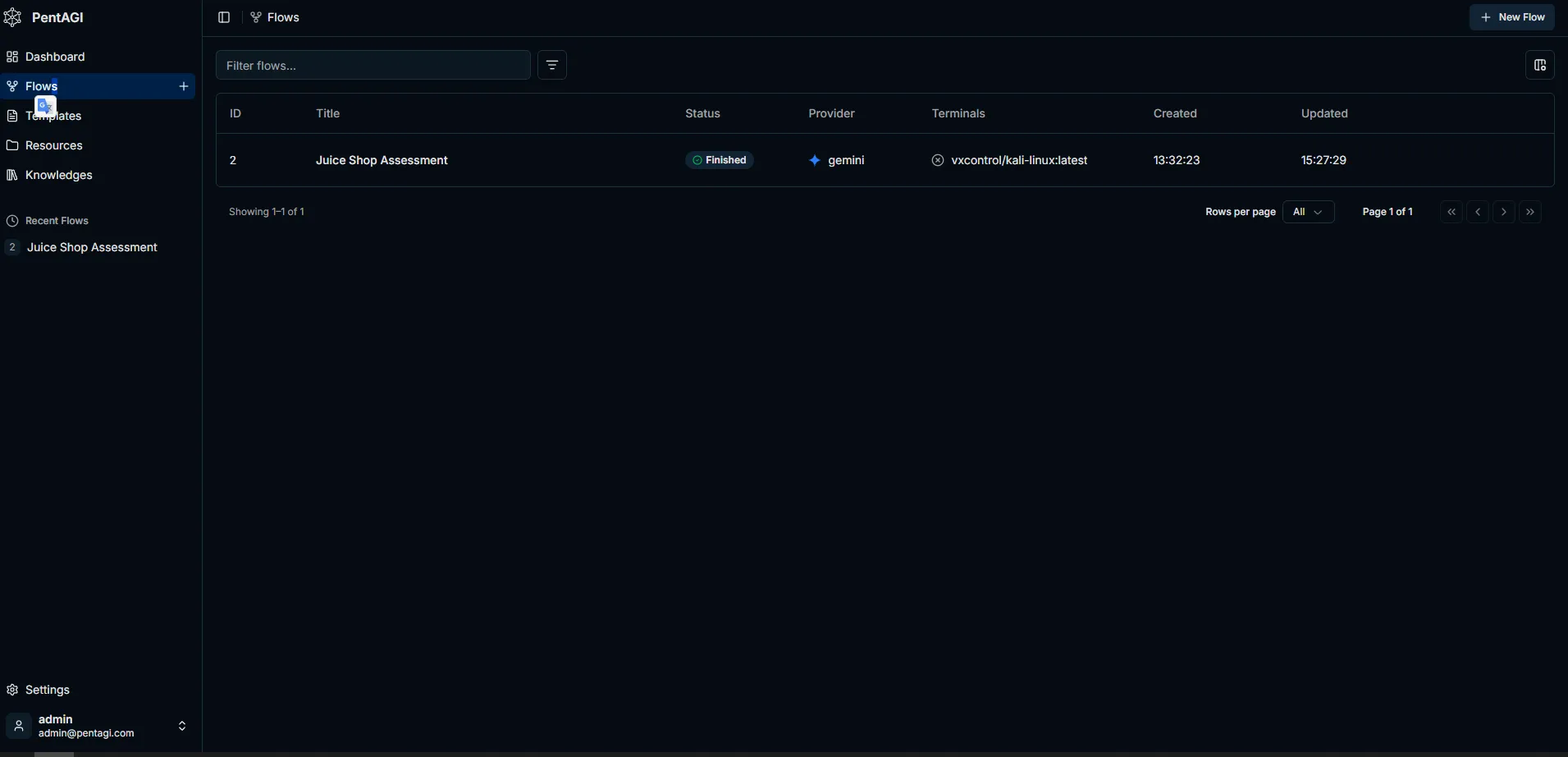
At the end of the lab, this screen confirmed that the Flow had reached the Finished state, used the Gemini provider, and ran with a Kali worker.
The Flow Finished, but What Was the Pentest Result?
Operational success and a security finding are not the same thing. The screenshot proves that the Flow completed, selected the Gemini provider, and started a Kali worker. The Markdown or PDF report generated by PentAGI was not exported during this exercise, however, so it would be technically incorrect to claim that a specific vulnerability was confirmed by our Flow.
PentAGI’s current documentation states that Flow reports can be reviewed in the web interface and exported as Markdown or PDF. It also recommends presenting confirmed findings with reproducible evidence. The defensible lab record is therefore:
Execution status : Completed
Target           : OWASP Juice Shop / isolated lab
Model            : Gemini
Worker           : Kali Linux container
Scope            : Reconnaissance + limited OWASP Top 10 checks
Confirmed finding: Cannot be established because the report was not retained
Next action      : Export the Flow report and manually validate the evidence
Candidate Findings Based on Official Documentation
The records below are not presented as findings from our Flow. They are representative finding summaries showing how vulnerabilities documented in the official OWASP Juice Shop companion guide could be structured in a PentAGI report.
| ID | Candidate finding | Risk | Evidence expected from PentAGI | Status |
|---|---|---|---|---|
| F-01 | SQL injection in the login flow | Critical | Affected endpoint, controlled request/response pair, session impact, and reproduction steps | Local validation required |
| F-02 | Broken access control on the administration area | High | Route and server response accessible with an anonymous or low-privilege request | Local validation required |
| F-03 | Exposure of a confidential document or file | Medium | Discovered path, HTTP status, and classification of the exposed data | Local validation required |
| F-04 | Internal information disclosure through error responses | Medium | Controlled malformed request and stack, path, or framework details in the response body | Local validation required |
The risk values in this table are lab prioritization only. A real report should recalculate severity using CVSS or the organization’s risk methodology after validating access conditions, affected data, privilege requirements, and business impact.
For example, the official Juice Shop guide documents an unsafe SQL query in the login function and explains that it can be identified at runtime. The same guide describes intentional challenges involving administration-area access control, access to another user’s basket, and overly detailed error messages. It also notes that some dangerous challenges can be disabled in containerized environments. A finding observed against another Juice Shop deployment must therefore not be assumed to exist in our Docker lab without local validation.
In the next run, the Report > Markdown output should be retained together with the completion screen. Every reported finding should then be checked against the command used, raw response, timestamp, and affected endpoint. An agent-generated explanation is not evidence by itself.
Sources: PentAGI usage and reporting documentation, OWASP Juice Shop SQL injection description, Broken Access Control scenarios, Security Misconfiguration scenarios.
Short Troubleshooting Notes
The table below maps common symptoms directly to their first control point. The objective is to distinguish whether a failure originates in the network, model-provider, or resource layer.
| Symptom | Likely meaning | Quick check |
|---|---|---|
ERR_CONNECTION_REFUSED | No externally reachable service may be listening on the port | Check docker ps and ss -lntp |
| HTTP error on the HTTPS port | The wrong protocol may have been used | Open the address with https:// |
| Gemini model 404 | The model may be unavailable to the account or retired | Select a currently available model in the provider settings |
| Gemini quota error 429 | The API quota may be exhausted or the free tier may be insufficient | Check the Usage and Rate Limits pages |
| DNS or IPv6 connection error | The server may not be reaching the Google API correctly | Test with curl -4 and inspect DNS settings |
| Insufficient memory | Services and the worker container may be competing for resources | Add memory or disable optional services |
A 429 quota error should be interpreted correctly. It does not mean that PentAGI failed to install. In many cases, it proves that the provider was reached successfully but the selected model hit its quota limit.
Security Hardening Notes
The following baseline controls apply to this architecture:
- Do not expose PentAGI directly to the internet.
- Restrict ports 8443 and 3000 to the administrator IP or lab network.
- Change the default administrator password after the first login.
- Never share API keys in
.envfiles, screenshots, or Git repositories. - Do not use cloud LLM providers with real customer data without appropriate review.
- Install PentAGI on a separate lab VM, not on a critical production server.
- Define the target scope explicitly in every Flow prompt.
- Explicitly prohibit denial-of-service, destructive actions, and out-of-scope scanning.
PentAGI accesses the Docker socket to create worker containers, which gives it significant control over the host. “It runs in a container” should never be treated as a reason to overlook host security.
Technical Assessment
The lab confirmed that the LLM is not the component performing the security test by itself. The model handles planning, tool selection, and output interpretation, while network and application interaction is performed by tools inside the Kali worker. Finding reliability therefore depends on the tool, command parameters, target response, and final validation step, not only on the model.
The Gemini API removed local model operations from scope, but quota, data-processing boundaries, and model availability became external dependencies. Long Flows require rate-limit and cost monitoring. Sending tool output from real systems to an external model is a data-governance decision before it is a configuration choice.
Using an intentionally vulnerable target such as OWASP Juice Shop also places the exercise on the right ethical foundation. Real-world pentesting is not only a technical skill. It is a process that includes authorization, scope, records, evidence, and clear boundaries.
Quick Checklist
Use this list when rebuilding the lab:
- A separate Ubuntu lab VM is ready
- Docker and Compose are working
- The PentAGI installer completed successfully
- The Gemini provider and model roles are configured
- The default administrator password has been changed
- The PentAGI interface is reachable at
https://SERVER_IP:8443 - Access is restricted to the lab or administrator network
- OWASP Juice Shop is running at
http://SERVER_IP:3000 - The Flow target is restricted to one URL
- Denial-of-service and destructive tests are prohibited in the prompt
- A Kali worker container was created during the first Flow
- Gemini quota and usage have been checked
Conclusion
We used PentAGI as an instrument for examining agent-based security testing rather than as a product demonstration. The resulting workflow consists of LLM planning, tool orchestration, isolated worker execution, and evidence validation.
The critical engineering point is that autonomy must not be confused with a lack of control. If target scope, permitted actions, network access, model quota, and manual finding validation are not defined in advance, the agent can become a faster source of uncertainty.
For that reason, a completed Flow is not sufficient evidence of platform quality. Repeatable evidence, scope adherence, accurate interpretation of tool output, and the analyst’s ability to audit the decision chain must be evaluated together.